To get started with Gaffer FC, pay once through Stripe checkout, open the login link or code sent to your email, and log in with the same email you paid with. Then follow the suggested trail on the Home tab: Positions, Formations, Concepts, Cascade, Set Pieces, Quiz and Minigame. This guide turns that trail into a seven-day plan, with tips to get more from each step.
Key Takeaways
- Gaffer FC is a one-time US$37 payment through Stripe; you then receive a login link or code by email and must log in with the same email you paid with.
- Progress is saved in the browser on the device you use and does not sync between devices, so use one browser on one device.
- The suggested trail on Home runs Positions, Formations, Concepts, Cascade, Set Pieces, Quiz, then Minigame.
- Start the minigame on Rookie, move to Pro once you are winning, and save Elite for later.
- Use the Board during a real match to sketch what you see, which links the course to the football you watch.
How Do You Buy Gaffer FC and Log In?
You buy Gaffer FC from the pricing section on the homepage. It is a single payment of US$37, with lifetime access and no subscription. Payment is handled by Stripe checkout.
After paying, you receive a login link or code by email. Log in with the same email address you used at checkout. That is how your access is matched to your purchase, so a different address will not show the course. If the email does not arrive within a few minutes, check your spam or promotions folder before anything else.
There is nothing to download. Gaffer FC runs in desktop and mobile browsers, and you can choose a light or dark theme.
What Should You Know Before Day One?
The most important thing to know is that your progress is saved in the browser on the device you use. It does not sync between devices. If you do Positions on your laptop and then open the app on your phone, the phone will not show that progress.
So pick one device and one browser for the course, and stick with them. A laptop or tablet is the most comfortable choice for the pitch-based modules, though phones work too. Avoid private or incognito windows, which usually wipe stored data when you close them, and be careful with tools that clear your browser data.
On your first visit, a short onboarding explains the app. After that, the Home tab shows your level, your XP and the suggested trail. You earn XP from lessons viewed, your quiz score, minigame wins and streaks, and achievements, and you climb through 7 levels from On the bench to The Gaffer.
Your First Week, Day by Day
This plan follows the suggested trail, one stage a day. It is a suggestion, not a rule. Set aside a short session each day rather than one long one. Spreading practice over several days is one of the two techniques rated most effective in Dunlosky and colleagues' review of learning methods, alongside practice testing.
Day 1: Positions
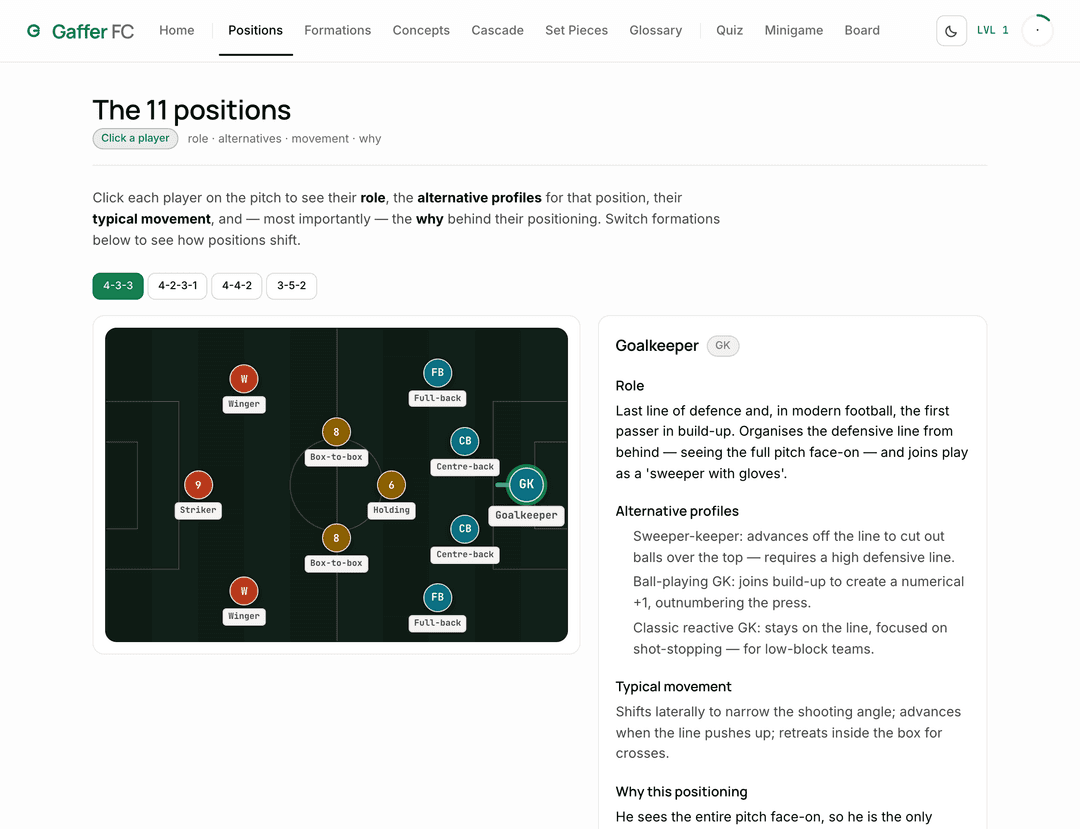
Open the Positions tab and click every player on the pitch. Each profile explains the role, alternative profiles, typical movement and why the player stands where they do. Then switch between 4-3-3, 4-2-3-1, 4-4-2 and 3-5-2 and watch how the full-backs and midfielders move. Viewing all 8 profiles unlocks the Tactical Observer achievement.
Day 2: Formations
Move to Formations and read the four cards: what each system solves, what it gives up and when to use it. Use the level filter if you want the basics first. To check your understanding, try explaining to yourself why a 4-2-3-1 might feel safer than a 4-3-3. Our 4-3-3 vs 4-2-3-1 comparison is a good follow-up.
Day 3: Concepts, part one
Start the Concepts module with the beginner-tagged ideas: the high press, the defensive blocks, compactness and strong side versus weak side. Do not try to finish all 12 today.
Day 4: Concepts, part two
Finish the remaining concepts, including the half-space, overload to isolate, the third-man run, marking systems and the offside trap. Seeing all 12 unlocks Pattern Recognition. If one idea feels slippery, read the free explainer on the blog, such as transitions explained.
Day 5: Cascade
Work through the four cascade scenarios using play, previous and next. Pause on each step and predict the next reaction before you move on. The "losing the ball" scenario pairs well with the transition concept from Day 4.
Day 6: Set Pieces and the Quiz
Watch the six set-piece routines with their narration, then take the 18-question quiz. Feedback is instant, so note which topics trip you up. Scoring 80% or more earns the Tactical IQ achievement, but a lower score is more useful than it feels, because it tells you what to revisit.
Day 7: Minigame
Play your first minigame matches on Rookie. Each match is 6 phases from a pool of 12 scenarios, and every decision is rated Excellent, Neutral or Poor. Read the decision log at the end of each match. Winning a scenario unlocks First Blood; three in a row unlocks Winning Run.
One stage a day, one browser, one match to test it on. That is the whole method.
What Tips Help You Get More From the First Week?
A few habits make a noticeable difference.
- Rookie first, then Pro. Rookie is more forgiving, which lets you focus on the reasoning. Once you are winning regularly, switch to Pro, the balanced setting. Elite is ruthless and best kept for when you want a real test.
- Read the log, not just the score. The end-of-match summary shows your grade, every decision and the match trends. Patterns in your Poor ratings tell you which concept to revisit.
- Predict before you click. In the cascade and the minigame, decide what you think happens next before you see it. Trying to recall an idea is what makes it stick: in Roediger and Karpicke's 2006 study, students who tested themselves remembered much more a week later than students who reread.
- Use the Board during a match. Keep the Board open while you watch a game. When something interesting happens, drag the players into the shape you saw. Sketching a team's press or build-up yourself is a good test of whether you really saw it.
- Stay on one device. It is worth repeating: progress lives in that browser.
Watch forDuring your first match after Day 4, watch only the team without the ball for ten minutes. Is it a low, mid or high block? Recreate that shape on the Board at half-time, then check whether it changed after the break.
What Should You Do After Week One?
After week one, switch from learning new modules to applying them. The course content does not change week to week, so the next stage is using it on real football.
Replay the minigame on Pro until your decisions are mostly Excellent, then try Elite, where a win unlocks Elite Mind. Retake the quiz a few days later and see whether your score holds. Go back to any concept that keeps showing up in your Poor ratings.
Then take it to the matches you watch. Our guide to watching football tactically gives you a simple routine, and the player and manager breakdowns on the blog, such as Rodri's playing style or Guardiola's tactics, show the same concepts in real teams. For a longer-term approach, read how to improve your football IQ. Free video channels such as Coaches' Voice, where coaches break down their own matches, are a good next step too.
What If Gaffer FC Isn't for You?
If the first few days show that this way of learning does not suit you, that is useful to know early. Gaffer FC has no video lessons, no community and no coaching certificate, and it is fine if you need one of those. There is a 7-day money-back guarantee; the refund policy explains the window and how to request one.
Frequently Asked Questions
How do I log in to Gaffer FC after buying?
After you pay through Stripe checkout, you receive a login link or code by email. Log in with the same email address you used to pay, because that is how your purchase is linked to your access. If the email has not arrived after a few minutes, check your spam or promotions folder. There is no app to install; everything runs in the browser.
Does Gaffer FC save my progress across devices?
No. Progress is saved in the browser on the device you use and does not sync between devices. If you start on a laptop and switch to a phone, the phone will not show your progress, levels or achievements. Choose one device and one browser for the course, and avoid private browsing windows, which usually clear stored data when closed.
What order should I do the Gaffer FC modules in?
Follow the suggested trail on the Home tab: Positions, Formations, Concepts, Cascade, Set Pieces, Quiz, then Minigame. Each step builds on the previous one, so the minigame makes most sense once you know the concepts it uses. Doing one stage a day gives you a complete first pass in about a week, though you can go at any pace.
Which minigame difficulty should I start on?
Start on Rookie. It is the most forgiving setting, so you can focus on understanding why each decision is rated Excellent, Neutral or Poor. Once you are winning regularly, move up to Pro, the balanced default. Elite is ruthless and leaves little room for mistakes, so treat it as a final test. Beating it unlocks the Elite Mind achievement.